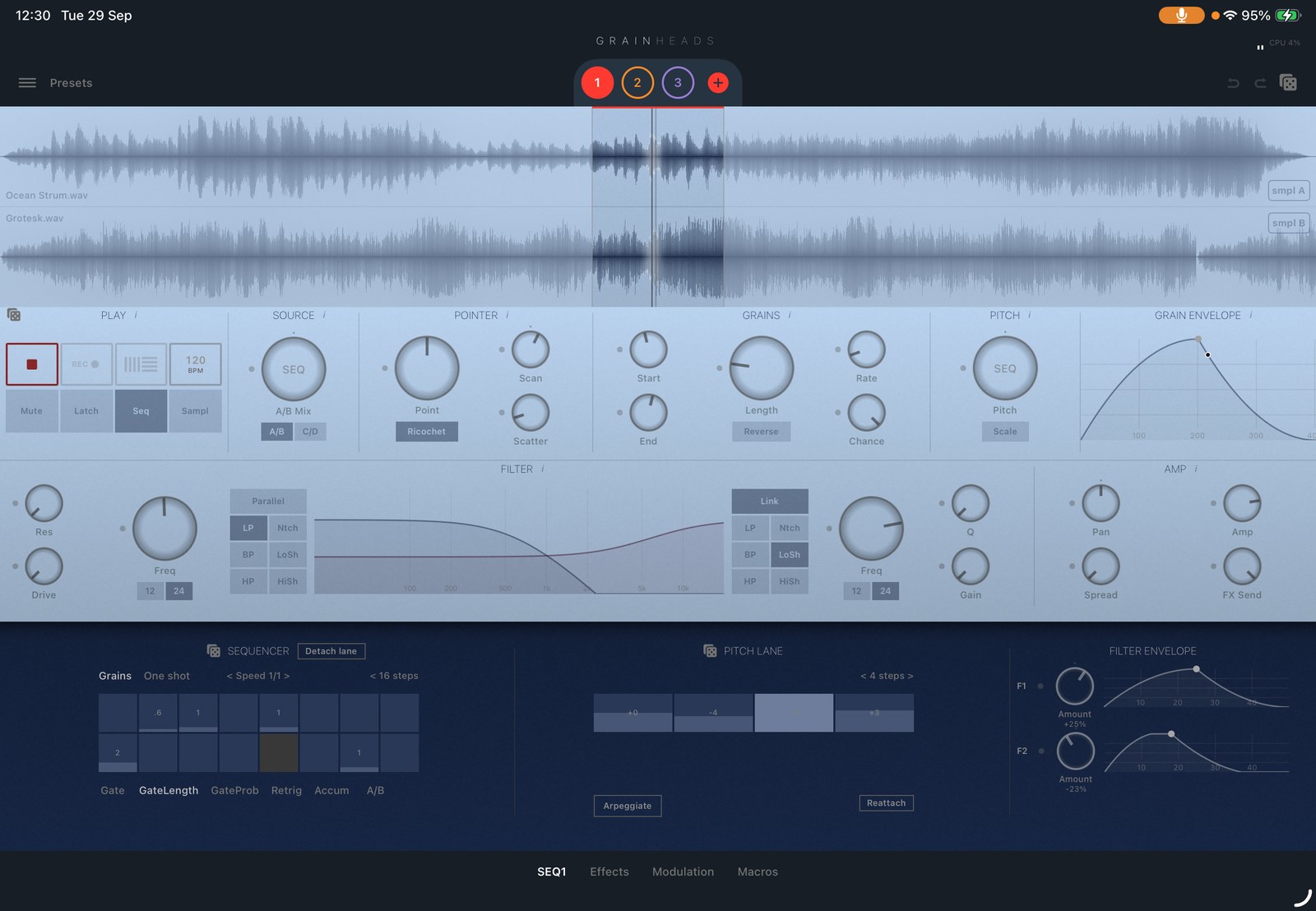
What is GrainHeads?
GrainHeads is a granular synthesizer for iPhone and iPad. It takes any audio sample, splits it into tiny overlapping fragments called grains, and plays them back as independent streams to build evolving textures, rhythmic patterns, ambient pads and glitchy soundscapes. It runs as a standalone app, as an AUv3 instrument, and as an AUv3 audio effect.
What is granular synthesis?
Granular synthesis slices audio into tiny fragments called grains and plays them back with independent control over pitch, position, speed, and density. Grain lengths vary by instrument — roughly 1 ms to a few seconds across the technique as a whole. In GrainHeads a grain runs from 10 ms to 2 s by default, and up to 5 s if you raise the maximum grain length in Settings (part of the full version). This lets you stretch, freeze, scatter, and reshape any sound into textures impossible with traditional synthesis.
How many granular playheads does GrainHeads have?
The standalone app runs up to 8 independent granular playheads. The AUv3 instrument and the AUv3 effect run up to 5. Each playhead has its own source, scope, pointer, grain settings, pitch, grain envelope, dual filters and output stage, so the heads can play completely different material at the same time.
Can different playheads use different samples?
Yes. GrainHeads has 4 sample slots (A–D), used as two pairs. A playhead reads either the A/B pair or the C/D pair and crossfades between the two samples with the A/B Mix control, which is itself modulatable. Different playheads can point at different pairs, so one head can granulate one sample while another head works on a different one.
Can I use GrainHeads as a plugin in my DAW?
Yes. GrainHeads ships two AUv3 plugins: an AUv3 instrument and an AUv3 audio effect. As an instrument it loads samples and generates granular textures. As an effect it captures live audio from the host and granulates it in real time. Both support multiple playheads, full modulation, host automation and preset recall.
Is GrainHeads an AUv3 effect?
Yes. Alongside the AUv3 instrument, GrainHeads ships a separate AUv3 audio effect extension. Place it on an FX bus, feed any input into its buffer, use the Feed/Frozen switch to lock the captured audio, then play up to 5 playheads from that material with the full effects chain and modulation system.
Does GrainHeads work in AUM?
Yes. GrainHeads registers as a standard AUv3 instrument and a standard AUv3 audio effect, so it loads in AUM like any other AUv3 plugin — as an instrument channel, or as an insert effect on a channel carrying live input or another app's output.
Does GrainHeads work in Logic Pro for iPad?
Yes. Logic Pro for iPad hosts AUv3 plugins, so GrainHeads loads as an AUv3 instrument on a software instrument track, or as an AUv3 audio effect on an audio track or bus, with host automation and preset recall.
Does GrainHeads work in GarageBand?
Yes. GarageBand for iOS supports AUv3 instruments and audio effects, so GrainHeads loads in both roles. GarageBand exposes less plugin automation than hosts such as AUM or Logic Pro for iPad, so for deep parameter automation those hosts give you more control.
Can GrainHeads process live audio?
Yes, through the AUv3 audio effect. It buffers incoming audio from the host — a microphone, an instrument input, or another app's output — and granulates it in real time. The Feed/Frozen switch decides whether the buffer keeps taking in new audio or holds what it captured so you can play the frozen material.
Can GrainHeads record microphone input?
Yes. The standalone app records audio through the device microphone and turns the recording into a sample you can granulate immediately. Microphone recording is part of the one-time full-version purchase.
Does GrainHeads support MIDI?
Yes. The standalone app takes CoreMIDI and Bluetooth MIDI input, with omni mode or one channel per playhead, an ADSR note envelope with velocity sensitivity, pitch bend, and CC learn for mapping hardware controls to parameters. The AUv3 adds a per-playhead MIDI mode that plays heads from host MIDI, applying each playhead's pitch setting as an offset on the played note.
Does GrainHeads support Ableton Link?
Yes. Ableton Link keeps GrainHeads' tempo in sync with other Link-enabled apps on the same device and with other devices on the same network. The LFOs, modulation envelopes and step sequencers can all be tempo-synced to that clock.
What is the difference between GrainHeads standalone and the AUv3?
The standalone app runs up to 8 playheads and adds features that only make sense outside a host — external CoreMIDI and Bluetooth MIDI input, audio recording, the sample browser and purchasable sample collections, and app-wide UI customization. The AUv3 instrument and effect run up to 5 playheads to stay within plugin memory limits, and in exchange they integrate with the host: parameter automation, preset recall with the host project, and, in the effect, live audio capture from the host.
What makes the modulation matrix different?
GrainHeads uses a summing modulation matrix — several sources (LFOs, envelopes, sequencer lanes) can target the same parameter at once, with their values added together. There are 8 LFOs with 6 shapes running from 0.002 Hz to 20 Hz, plus 2 freely drawn modulation envelopes, and LFOs can modulate other LFOs' speed. Virtually every parameter is a modulation target, including sample slot selection, scan direction and effect parameters.
How does the sequencer work?
Each playhead set to Seq mode runs its own 16-step sequencer with Gate, GateLength, GateProb, Retrig, Pitch, Accum and A/B Mix lanes, an adjustable step count and a per-step filter envelope. Any knob can be routed to a sequencer lane for per-step values, and individual lanes can be detached to run at their own step count, producing polyrhythms inside a single playhead.
What is Sampl mode?
Sampl is a per-playhead performance mode that turns the waveform into a multi-touch instrument. You slice the sample into zones with draggable dividers, each finger plays its own zone, and any subset of parameters — A/B mix, scrub speed, pan, both filters' frequency, resonance and drive, FX send, amp, delay and reverb sends, lo-fi bits — can be macro-mapped to vertical finger position.
What are the macros?
Three XY macro pads give six axes. Any axis can be assigned to any parameter, with its own amount and direction, alongside the LFOs and envelopes — so one gesture moves as much of the patch as you choose, and the routing travels with the preset.
What audio formats can GrainHeads import?
GrainHeads imports the common audio formats iOS can decode, including WAV, AIFF, CAF, MP3 and M4A. You can bring files in from the Files app, drag and drop them from another app, or record a new sample with the microphone.
Is GrainHeads free?
GrainHeads is free to download and comes with built-in samples. A single one-time purchase unlocks the full version: importing your own samples, recording audio samples, loading all saved presets, the online sample library, and full app UI customization. There is no subscription. Additional sample collections are sold separately, with a bundle that unlocks all of them.
What devices does GrainHeads support?
GrainHeads requires iOS 17.6 or later and runs on iPhone and iPad. The layout adapts responsively to any screen size, including iPad split-screen multitasking.
Is GrainHeads available for Android?
No. GrainHeads is an iOS application built on Apple's audio frameworks and the AUv3 plugin format, and there is no Android version.
Is GrainHeads available for macOS?
There is no native macOS build — GrainHeads is built for iPhone and iPad, and its plugins use the iOS AUv3 format rather than the desktop Audio Unit format used by macOS DAWs.